PDMS Software (Oil & Gas Plant Design) Course in Dubai
This PDMS course in Dubai trains you to build and extract a 3D plant model the way oil and gas design offices do.
About the PDMS Software (Oil & Gas Plant Design) course in Dubai
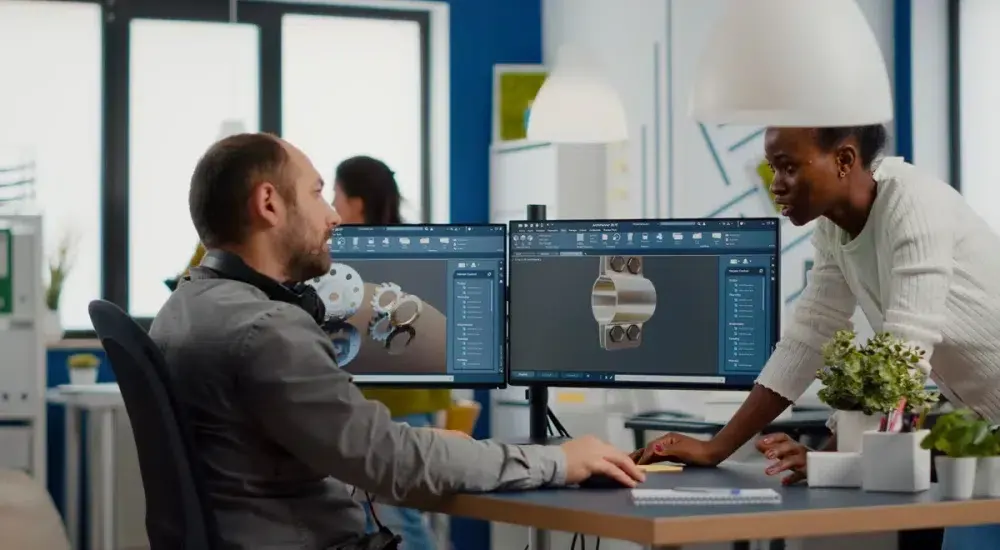
This PDMS course in Dubai trains you to build and extract a 3D plant model the way oil and gas design offices do. You start with the database hierarchy and navigation, then model equipment, steel structures and process piping, run clash checks, and produce general arrangement drawings, isometrics and material take-offs. Every module feeds one practice unit, so by the end you have a model and drawing set you can show at interview. It suits mechanical and piping engineers, plant designers and CAD draughtspersons in the UAE who support EPC contractors, refineries, gas plants and utilities.
PDMS (Plant Design Management System) is AVEVA's 3D plant design software for modelling equipment, piping, structures and supports in a shared multi-user database. Design teams use it to coordinate disciplines, detect clashes and generate drawings, isometrics and reports for oil, gas, power and process plants.
At Solve Tech in Deira, Dubai, the PDMS Software (Oil & Gas Plant Design) course takes 60 Hours and is offered online, offline and hybrid on weekend and weekdays. It suits mechanical engineers, designers and draughtsmen who model equipment, piping or building services. The emphasis is on doing the work, with a trainer beside you to correct mistakes as they happen. Learners often pair it with AutoCAD MEP or SolidWorks. Classroom learners come to Mabrooka Building 04 on Al Muraqqabat Road, a short walk from Al Rigga Metro Exit 2, and online learners follow the same syllabus live. You can compare every option under Mechanical & Plant Design courses. Message us for the syllabus, the fee and the next batch date.
Watch: training at Solve Tech
Why Solve Tech
- Trainers from the fieldEngineers with design, contracting and facilities experience.
- Project-based learningYou complete the work yourself and your trainer reviews it.
- Flexible batchesWeekday, evening and weekend, in class or live online.
- KHDA-permitted instituteCourse completion certificate, with KHDA attestation for eligible courses.
- Central Deira locationNear Deira Clocktower and Al Rigga Metro Station, Exit 2.
- Honest course adviceAn advisor matches the course to your background.
What You Learn in the PDMS Software (Oil & Gas Plant Design) Course in Dubai
- Navigate the PDMS database hierarchy from World to Site, Zone and element level
- Model vessels, pumps and heat exchangers with correctly oriented nozzles
- Build steel structures, platforms, ladders and handrails from section catalogues
- Route process pipes against a piping specification with fittings, valves and slopes
- Place pipe supports and resolve clashes found during model checks
- Produce plans, sections and general arrangement drawings in Draft
- Generate isometrics and material take-off reports with Isodraft
Who Should Take the PDMS Software (Oil & Gas Plant Design) Course
- Mechanical and piping engineers aiming for EPC design roles
- Plant design and CAD draughtspersons moving from 2D to 3D
- Engineering graduates targeting oil, gas and petrochemical projects
- Site and construction engineers who read 3D models and isometrics
- Designers preparing to move on to AVEVA E3D Design
Entry Requirements for the PDMS Software (Oil & Gas Plant Design) Course
A mechanical, chemical or piping background is expected, either a degree, diploma or design-office experience, and reading P&IDs is helpful. You need a laptop for online sessions, and classroom learners use the institute's training setup.
Tools Covered in the PDMS Software (Oil & Gas Plant Design) Course
- AVEVA PDMS Design module
- AVEVA PDMS Draft
- Isodraft
- Paragon catalogue and specification tools
- AVEVA Review and Navisworks model export
- P&IDs and piping line lists
- ASME B31.3 piping principles
- Piping material specifications
Benefits of the PDMS Software (Oil & Gas Plant Design) Training Course
- PDMS models are still maintained on many brownfield refinery, gas and utility plants in the UAE and wider Gulf
- Skills transfer directly to AVEVA E3D, which keeps the same database concepts and much of the command logic
- A finished practice model with drawings and isometrics gives you evidence of skill for design-office interviews
- Understanding clash checking and data consistency helps you work smoothly inside multi-discipline EPC teams
- Evening and weekend batches let working engineers train without leaving site or office roles
Learning Outcomes of the PDMS Software (Oil & Gas Plant Design) Course
By the end of the course you will be able to:
- Set up zones and sites and navigate a multi-discipline PDMS model
- Model a process area containing at least three equipment items with nozzles
- Route and specify a set of process lines that pass data consistency checks
- Detect and resolve clashes between piping, steel and equipment
- Issue a general arrangement drawing, isometrics and a material take-off for the practice unit
PDMS Software (Oil & Gas Plant Design) Course Outline
9 modules · 60 contact hours · practical project in the final module
Module 1: PDMS Environment and Project Structure6 hrs
- Role of 3D plant design in oil and gas EPC projects
- PDMS modules: Admin, Paragon, Design, Draft and Isodraft
- Database hierarchy: World, Site, Zone, Equipment and Pipe
- Graphical view, explorer, members list and command window
- Reading P&IDs, plot plans and line lists before modelling
Outcome: You can navigate a PDMS project and explain how its data is organised.
Module 2: Equipment Modelling8 hrs
- Building equipment from primitives and templates
- Positioning, orientation and coordinate systems
- Vessels, columns, pumps and shell-and-tube exchangers
- Adding and orienting nozzles from the catalogue
- Equipment naming and attributes for reports
Outcome: You can model process equipment with accurate nozzles ready for piping.
Module 3: Structural Modelling8 hrs
- Grid lines and structural levels
- Columns, beams and bracing from section catalogues
- Floors, panels and platform plates
- Ladders, stairs and handrails
- Joints, fittings and steel connections
Outcome: You can build pipe racks and access platforms that support the process layout.
Module 4: Piping Design and Routing12 hrs
- Pipe specifications, bores and component selection
- Creating pipes and branches with heads and tails
- Routing with elbows, tees, reducers, flanges and valves
- Slopes, offsets and instrument connections
- Data consistency checks and correcting routing errors
- Piping layout principles for maintenance and operability
Outcome: You can route specification-driven process lines that pass consistency checks.
Module 5: Pipe Supports and HVAC Basics6 hrs
- Support types and where they are needed
- Placing supports and linking them to steel
- Basic HVAC duct modelling in plant buildings
- Cable tray awareness for coordination
- Attributes needed for support schedules
Outcome: You can add supports and basic services that complete the model for review.
Module 6: Clash Checking and Model Review4 hrs
- Running clash detection by zone and discipline
- Classifying hard and soft clashes
- Fixing clashes and re-checking
- Exporting models for AVEVA Review or Navisworks sessions
Outcome: You can run a model review cycle and close clash items.
Module 7: Drawing Production in Draft6 hrs
- Creating drawing sheets, views and scales
- Plans, sections and general arrangement drawings
- Dimensions, labels and intelligent annotation
- Title blocks, revision control and issuing drawings
Outcome: You can produce general arrangement drawings directly from the model.
Module 8: Isometrics and Reports4 hrs
- Isodraft options and isometric styles
- Generating isometrics for pipes and spools
- Material take-off and bill of materials
- Custom reports from model attributes
Outcome: You can issue isometrics and material lists that fabricators and buyers can use.
Module 9: Capstone: Process Unit Model6 hrs
- Brief based on a small pump and exchanger unit
- Modelling equipment, steel and piping to a line list
- Clash check and corrections
- Drawing set, isometrics and MTO submission with trainer review
Outcome: You complete a full plant model and deliverable set for your portfolio.
How You Are Assessed
You build a small process unit model with drawings, isometrics and a material take-off that the trainer reviews against a checklist, plus short practical tests after the equipment and piping modules. A Solve Tech course completion certificate is issued after the course hours and assessment are completed.
Career Paths After the PDMS Software (Oil & Gas Plant Design) Course in the UAE
- PDMS piping designer
- 3D plant design draughtsperson
- Piping design engineer
- Plant layout and modelling technician
- E3D or PDMS model coordinator
Guides to read before you enrol

Certificate
You receive a Solve Tech course completion certificate after the course and its assessment. KHDA-attested certificates are available for eligible courses. How our certificates work
Related Mechanical & Plant Design courses
View allFAQ About PDMS Software (Oil & Gas Plant Design) Courses
How long is the PDMS Software (Oil & Gas Plant Design) course?
The PDMS Software (Oil & Gas Plant Design) course is 60 Hours.
Who should take the PDMS Software (Oil & Gas Plant Design) course?
Mechanical and piping engineers aiming for EPC design roles; Plant design and CAD draughtspersons moving from 2D to 3D; Engineering graduates targeting oil, gas and petrochemical projects; Site and construction engineers who read 3D models and isometrics; Designers preparing to move on to AVEVA E3D Design.
Which tools are covered in the PDMS Software (Oil & Gas Plant Design) course?
AVEVA PDMS Design module, AVEVA PDMS Draft, Isodraft, Paragon catalogue and specification tools, AVEVA Review and Navisworks model export, P&IDs and piping line lists, ASME B31.3 piping principles, Piping material specifications.
Is PDMS still worth learning now that AVEVA E3D exists?
Yes, because many operating plants still hold their models in PDMS and E3D is built on the same database concepts. Learning PDMS first gives you the hierarchy, catalogue and specification logic that you will use again in E3D.
Do I need AutoCAD knowledge before joining?
No, AutoCAD is not required, though basic drafting knowledge helps. What matters more is understanding piping components, P&IDs and plant layout, which the first module reviews.
Will I learn to create isometric drawings?
Yes, Isodraft is covered in its own module. You generate isometrics and material take-offs from the pipes you routed in the practice model.
Does the course cover catalogue and specification administration?
It introduces how catalogues and piping specifications are structured in Paragon so you understand where components come from. Full administrator-level catalogue building is outside the scope of this designer-focused course.
Is the PDMS Software (Oil & Gas Plant Design) course available online?
Delivery modes for this course: Online, Offline, Hybrid. Ask an advisor for the next batch in the mode you prefer.
Can I attend on weekends?
This course runs on: Weekend & Weekdays.
Where is the PDMS Software (Oil & Gas Plant Design) course held in Dubai?
At Solve Tech Training Institute, Office M09, Mabrooka Building 04, Al Muraqqabat Road, near Deira Clocktower. The nearest metro is Al Rigga Station, Exit 2.
What is the fee?
Fees depend on the format and batch. Send an enquiry to receive the current fee.
About Solve Tech Training Institute
Solve Tech Training Institute is a KHDA-permitted technical and occupational skills training centre in Deira, Dubai. We teach engineering, technical and professional courses in the classroom, live online and on site for companies, with trainers who work in the fields they teach. This page is published by the Solve Tech training team and was last updated in October 2026.
About usAccreditation and certificatesPhotos of our labsContact and map
Al Muraqqabat Road, near Deira Clocktower
Dubai, UAE
+971 50 691 4688